Category: Script Library
Open In External Editor
Opens a script in an external editor with support of reloading such edits back into Tap Forms Pro.
Tap Forms' script editor has come a long way. Still, once in a while I'm looking for some more advanced features and more customizabilty. That's the origin of the idea for the Open In External Editor script. Now with advances in AI powered editors like Cursor, I'm using this script more than ever.
When the script is directly called, a popup opens and allows one to select the external editor. This selection is used to create a document script. Now, whenever you want to edit a script in the external editor, use that document script. Per default, the 'favorite' flag is automatically set. I'd recomment to set a keyboard shortcut as well. The naming scheme is "Edit In Editor Name".
When the document wrapper script is called, using a popup, a target script is selected from the current form and then opened in the external editor. While using an advanced editor like Textmate or Cursor, changes are automatically read back into Tap Forms Pro and the script code is updated. Please note that if a script is already open in the script editor, the changes do not show. Close the file and reopen it again to see the modifications.
A readback script is provided to facilitate reading back changes. This allows advanced edtiors to automatically update the Tap Forms Pro script.
Updates
- 6/12/2025: Restores the form when editor was called and opens 'Default Layout'
- 8/12/2025: Changed behavior: when the script is directly called, a document script wrapper for the selected editor is created. With this document script, form scripts in different forms can easily be edited.
Planned Features
- Support for field scripts
- Support for field Ids
Configuration Option
The external file is opened with
openInExternalEditor(urlScheme);
With:
- urlScheme (function): URL scheme function
The urlScheme function returns an URL using the application specific URL scheme.
Examples:
- Textmate:
openInExternalEditor(function(file){return "txmt://open?url=file://"+file});
- Visual Studio Code (VSC)
openInExternalEditor(function(file){return "vscode://file/"+file});
- Sublime
openInExternalEditor(function(file){return "subl://open?url=file://"+file});
- Cursor, an AI powered code editor
openInExternalEditor(function(file){return "cursor://file/"+file});
Usage
Document Script Wrapper
When the Open in External Editor script is directly called, a document script wrapper is created for one particular tool. The Open in External Editor script is a perfect candidate for a Document script. In order to not loose future updates using the scriptHandler, a separate Document script should be created that just calls the main script:
Following external editors are currently supported:
- TextMate
- VSC
- Sublime
- Cursor
Reading back edited file
Note: Due to Tap Forms Pro API limitatins, reading back is currently only supported with form scripts!
The Open In External Editor script creates a callback shell script named scriptName-callback.sh. Calling this shell script will update the user script inside Tap Forms Pro.
Reading back using Textmate
In order to support, the javascript bundle needs to be enhanced. Here are the steps:
1) Edit the javascript bundle (ctrl-option cmd-b, then select the javascript bundle)
2) Create a new command: cmd-n, then select Command.
3) Set the parameters and shell script as shown below.
4) Save changes (cmd-s)
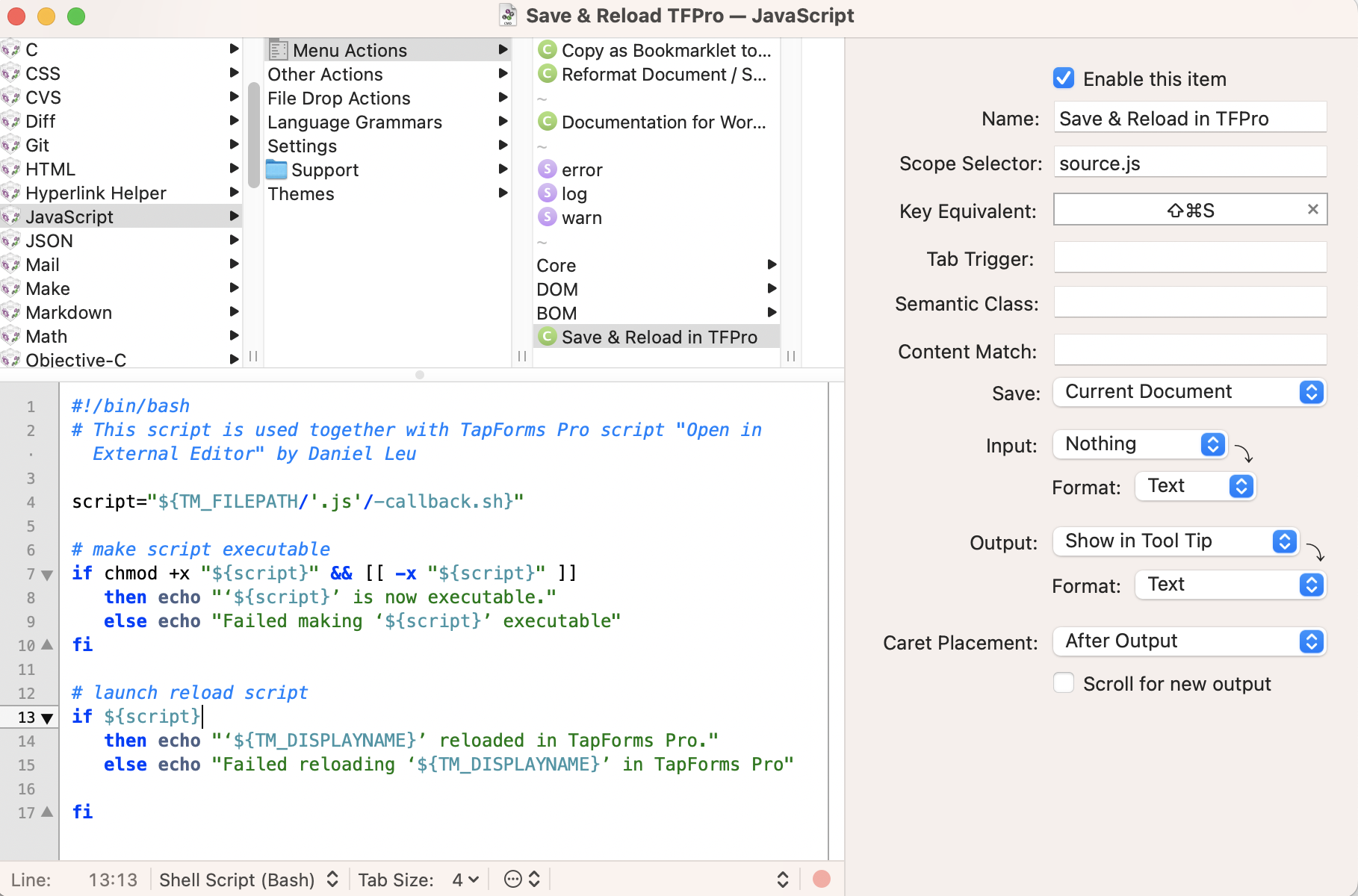
Textmate command script:
#!/bin/bash
# This script is used together with Tap Forms Pro script "Open in External Editor" by Daniel Leu

# create callback path
script="${TM_FILEPATH/'.js'/-callback.sh}"

# make script executable
if chmod +x "${script}" && [[ -x "${script}" ]]
   then echo "‘${script}’ is now executable."
   else echo "Failed making ‘${script}’ executable"
fi

# launch reload script
if ${script}
   then echo "‘${TM_DISPLAYNAME}’ reloaded in Tap Forms Pro."
   else echo "Failed reloading ‘${TM_DISPLAYNAME}’ in Tap Forms Pro"

fi
Now whenever you edit a Tap Forms Pro script in Textmate, you can press shift cmd-s to save your changes and have them read back automatically into Tap Forms Pro. If a script is already open in the Script Editor, it will not be updated!
Reading back using VS Code, Cursor etc
All VS Code based editors such as Cursor can be customized to run the callback script to reload the edits back into Tap Forms Pro.
1) Install the multi-command extension
Menu: Settings > Extensions, then search for multi-command and install it.
2) Define a new task Reload in TFP to execute the Tap Forms Pro callback script
Menu: Settings > Task, enter following code, or
{
    // See https://go.microsoft.com/fwlink/?LinkId=733558
    // for the documentation about the tasks.json format
    "version": "2.0.0",
    "tasks": [
        {
            "label": "Reload in TFP",
            "type": "shell",
            "command": "bash",
            "args": [
                "-c",
                "filename=\"${file}\"; sh \"${filename%.js}-callback.sh\""
            ],
            "kind": "build",
            "isDefault": true,
            "presentation": {
                "reveal": "always",
                "panel": "shared"
            }
        }
    ]
}
3) Define the keyboard shortcut shift cmd-s
Menu: Settings > Profiles > Keyboard Shortcuts, then insert following code segment
[
{...},
{
    "key": "shift+cmd+s",
    "command": "extension.multiCommand.execute",
    "args": {
        "sequence": [
            "workbench.action.files.save",
            {
                "command": "workbench.action.tasks.runTask",
                "args": "Reload in TFP"
            }
        ]
    },
    "when": "editorTextFocus"
}
]
I use the shift cmd-s keyboard shortcut for this action. First the code is saved and then the Reload in TFP task is called. This executes the callback shell script to get the code back into Tap Forms Pro.
Reading back from within Tap Forms Pro
When the script is opened in the external editor, Tap Forms Pro will print the callback URL on the console log:
Opening file: /Users/daniel/Desktop/tmp/Open-In-External-Editor.js
callbackUrl: tfpro://script/db-264c2174dc8342d4aefa5e3876a8b799/frm-131bcace5d61472e9824505036ebc64d/Open%20In%20External%20Editor?fileUrl=file:///Users/daniel/Desktop/tmp/Open-In-External-Editor.js&formId=frm-131bcace5d61472e9824505036ebc64d&_scriptId=scr-a58d5dcee18947fa834290406639db1b
Created callback file: file:///Users/daniel/Desktop/tmp/Open-In-External-Editor-callback.sh
Clicking on this callback URL link will automatically read back the changes and save them in your script.
Reading back using XYZ.app
Most of the editors out there are programmable and support adding language specific features. The concept presented for Textmate and VS Code should be easily adjusted for other editors.
Installation
The Open In External Editor script is installed using the scriptHandler script about which you can learn more over [here](https://lab.danielleu.com/Tap Formspro/scripthandler.html). It is installed in the Scripts form.
Dependencies
Following helper script is needed
- prompterHelper
This scripts can be installed using the scriptHandler.
ChangeLog
Link to ChangeLog
Author
- Daniel Leu, info@danielleu.com
Do you like this script? Are you using it? Please consider supporting me by buying me a coffee!

Thanks!
Last modified: Aug 21, 2025 5:48:27 PM
Tap Forms Consulting
Do you need help writing scripts for your Tap Forms Pro database? I'm happy to help you. Contact me to discuss your idea or project.
Web Design Consulting
Do you need help designing your web site or getting Backlight working the way you want? Contact me to discuss your needs.
Buy me a Coffee
If you like what I share here, please consider buying me a coffee or a print. This helps keeping me motivated to continue posting. Thank you!