Category: Script Library
scriptHandler
A management script for my TapForms Pro script repository.
I keep a script repository on my server where I maintain a set of scripts that I share among different TapForm Pro applications. By having them accessible online, it is easy to maintain, update and reuse them whenever needed.
scriptHandler is the application that provides an easy to use interface to install and update such scripts. Additionally, it contains links to the revision history and documentation.
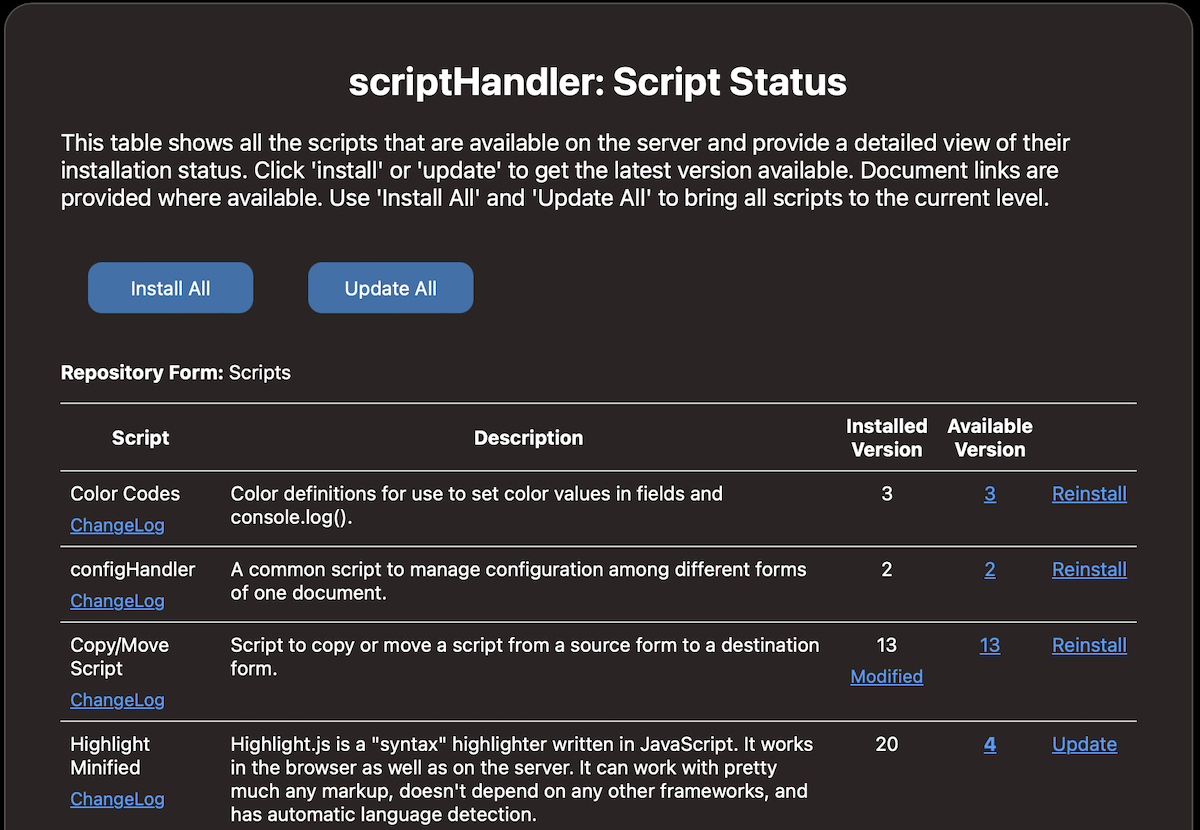
Usage
The scriptHandler provides a simple graphic user interface using a local web browser as the user interface. It lists all available scripts, the installed version and the server versions, direct links to the documentation, and the change history.
Several direcct actions are available:
- modif: shows the difference between the current version and the updated version from the server. This is only visible if the installed version doesn't match the server version. This can be that a newer version is available or the installed version was modified.
- install: installs latest version of the script
- reinstall: deletes the selected script and installs the latest version
- update: updates the selected script to the latest version
Installation
To install the scriptHandler script, I'm using this little helper script. It creates the scriptHandler form that will contain the scriptHandler script and all scripts managed by it. Once the installation is complete, this install script can be deleted.
var scriptName = 'scriptHandler';

function scriptHandler_Install_Script() {
    // defaults
    const SCRIPTFORM = 'scriptHandler';

    // Link to repository
    let url = "https://api.danielleu.com/tfp/files/";

    // Create form that contains all the scripts, if it doesn't exist yet
    var scriptForm = document.fetchForms().filter((a) => a.name === SCRIPTFORM);
    if (scriptForm.length == 0){
        scriptForm = document.createNewFormNamed(SCRIPTFORM);
    } else if (scriptForm.length > 1){
        console.log("More than one form named '"+SCRIPTFORM+"' exists! Erase all but one! Aborting!", "#ff0000");
        return;
    } else {
       scriptForm = scriptForm[0];
    }

    // Fetch and Install scriptHandler
    let scriptCode = Utils.getTextFromUrl(url+"scriptHandler.js");
    let scriptObj = scriptForm.addNewScriptNamed("scriptHandler");
    scriptObj.code = scriptCode;
    scriptObj.isFavourite = 1; // make script accessible from menu!
    document.saveAllChanges();

    // Start scriptHandler
    document.getFormNamed(SCRIPTFORM).runScriptNamed('scriptHandler');
}

scriptHandler_Install_Script();
Note:
- If your Tap Forms Pro version is lower than 1.2, you will need to start the script scriptHandler in order to finish the install.
- This script needs Script Access Folder tobe set to a valid location. This can be done in the TapForms Pro settings.
Dependencies
Following helper scripts are needed
- htmlPrompter
- jsdiff
- prompterHelper
These scripts will be automatically installed by the scriptHandler.
ChangeLog
Link to ChangeLog
Author
- Daniel Leu, info@danielleu.com
Do you like this script? Are you using it? Please consider supporting me by buying me a coffee!

Thanks!
Last modified: May 12, 2025 7:05:42 PM
Tap Forms Consulting
Do you need help writing scripts for your Tap Forms Pro database? I'm happy to help you. Contact me to discuss your idea or project.
Web Design Consulting
Do you need help designing your web site or getting Backlight working the way you want? Contact me to discuss your needs.
Buy me a Coffee
If you like what I share here, please consider buying me a coffee or a print. This helps keeping me motivated to continue posting. Thank you!