Category: Tips & Tricks
Using Fractions
I’ve been building my own wooden picture frames for my photo prints, and to streamline the process I created a form that helps me design each frame and calculate the dimensions of the individual pieces I need to cut.
To make the form more practical for woodworking, I wanted to work with fractional measurements rather than decimals. Unfortunately, Tap Forms doesn’t support fractional numbers natively.
I did find a workaround, though. Instead of using number fields, I switched to text fields and attached a field script to each one to handle formatting. Additional helper functions then parse the fractional input into decimal values for calculations and convert the results back into fractions for display.
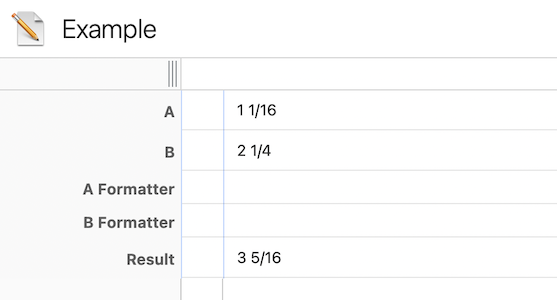
Following figure shows my example application with two inputs fields, two field scripts for formatting and the script field to calculate the result.
- The presented solution works with Tap Forms 5 and Tap Forms Pro.
- The formatter fields are only shown as illustrations. For normal operation, they don't need to be visible and can easily be hidden using the inspector panel.
Usage
This section describes how to use the helper functions in Tap Forms for both input formatting and calculated result fields.
Input formatters
Input formatter scripts are attached to text fields that represent numeric values. These formatters allow users to enter numbers either as decimals or as fractions (for example,"1.5","1/2", or"1 1/2").
When the input is updated, the formatter parses the entered value and normalizes it to a consistent mixed fraction format for display, improving readability while keeping inputting values flexible.Calculated outputs/results
These script fields read values from the formatted input fields, convert them to decimal numbers for arithmetic operations, and then return the result in mixed fraction format. This keeps all calculations accurate while ensuring results are displayed in a form that matches the input style used throughout the form.
Loading the helper script
Before calling any helper functions, the fractionHelper script must be loaded.
If the helper script is stored in the same form as the calling script (for example, the “Example” form), load it with:
form.runScriptNamed("fractionHelper");
If the helper script lives in a dedicated scriptHandler form, load it like this:
document.getFormNamed('scriptHandler').runScriptNamed("fractionHelper");
function formatField(field_id)
Reads a text field’s value, parses it (decimal or fraction), converts it to mixed fraction notation, and writes it back into the same field so the user sees values like "3 1/2" instead of "3.5".
Each formatter is implemented as a script field that runs when the record (or a linked field) changes. The script must load fractionHelper and then call formatField(field_id) with the ID of the text field to format.
Parameters
field_id- the ID of the text field to format (for example,'fld-xxxx'). The field must exist and be of type text.
Returns
- Nothing (void). The formatted value is written back into the field and the document is saved.
Example
form.runScriptNamed("fractionHelper");

function A_Formatter() {
    // const dummy = record.getFieldValue('fld-xxx')
    // This dummy entry is required to trigger the execution of this field script
    const field_id = 'fld-2fd3a13ed2d949f5a44aae34f557fc46';
    formatField(field_id);
}

A_Formatter();
Important (Tap Forms quirk):
- The commented
record.getFieldValue(...)line must remain in the script. Tap Forms uses it as one of the qualifiers determining if this field script needs to be executed.
Removing it will prevent the formatter from running. - When developing your application and creating these formatting field scripts, Tap Forms 5 might not trigger such scripts. Closing and reopening Tap Forms 5 fixes this.
function parseIntFraction(str)
Parses a string or number and returns the equivalent decimal value. Use this whenever you need to read a fraction-formatted field and use its value in calculations.
Parameters
- str — value to parse (string or number, for example record.getFieldValue('fld-xxx'))
Returns
- A number. Invalid or empty input returns 0.
Accepted formats
- Decimals: "1", "1.5"
- Fraction only: "1/2"
- Integer + fraction: "3 1/2", "32 15/16"
- Whitespace is trimmed and normalized.
parseIntFraction("1 1/2")     // -> 1.5
parseIntFraction("32 15/16")  // -> 32.9375
parseIntFraction("")          // -> 0
function makeIntFraction(num)
Converts a decimal number to a string in mixed fraction notation (for example, "1 1/2"). Use this to display calculation results in fraction form.
Parameters
- num — the value to convert.
Returns
- A string such as "1", "1/2", or "3 1/2".
- Returns an empty string ("") if num is not finite (NaN or Infinity).
makeIntFraction(1.5)      // -> "1 1/2"
makeIntFraction(32.9375) // -> "32 15/16"
makeIntFraction(1)       // -> "1"
Example Application
A simple example form demonstrates how all pieces fit together:
- Two text input fields,
aandb, where the user enters values as decimals or fractions (for example,"1.5"or"1 1/2"). - Two script fields,
a_formatterandb_formatter, which run when the user edits the corresponding input field. Each formatter callsformatField()with the ID of its input field so the value is immediately displayed in mixed fraction notation. - One output/result (script) field that performs a calculation (for example, the sum or product of
aandb). It usesparseIntFraction()to read and parse the input values, performs the calculation, and returns the result usingmakeIntFraction(result)so the output is shown in mixed fraction form.
Example output script (sum of a and b)
form.runScriptNamed("fractionHelper");

function Result() {
    // read raw input values
    const a = record.getFieldValue('fld-2fd3a13ed2d949f5a44aae34f557fc46');
    const b = record.getFieldValue('fld-1b3ad565277448b99a53843d685457e4');

    // parse inputs (decimal or fraction)
    const a_value = parseIntFraction(a);
    const b_value = parseIntFraction(b);

    // perform calculation
    const res = a_value + b_value;

    // format and return result
    return makeIntFraction(res);
}

Result();
Two Tap Forms archive files are provided, one for Tap Forms 5 and one for Tap Forms Pro. Each archive contains this example application along with the fractionHelper script required for fractional number handling.
Author
- Daniel Leu, info@danielleu.com
Do you like this script? Are you using it? Please consider supporting me by buying me a coffee!

Thanks!
Last modified: Feb 9, 2026 10:15:17 AM
Tap Forms Consulting
Do you need help writing scripts for your Tap Forms Pro database? I'm happy to help you. Contact me to discuss your idea or project.
Web Design Consulting
Do you need help designing your web site or getting Backlight working the way you want? Contact me to discuss your needs.
Buy me a Coffee
If you like what I share here, please consider buying me a coffee or a print. This helps keeping me motivated to continue posting. Thank you!