Category: Tips & Tricks
Using Unicode Emoji Characters to Highlight Status
In a busy database, rows of text can quickly start to look the same. When you’re managing complex projects, government contracts, or inventory, you need to know the status of a record at a glance.
One of the most effective and aesthetically pleasing ways to do this in Tap Forms Pro is by leveraging Unicode Emoji Characters. Because emojis are treated as text, you can use them across your entire database to create high-contrast, color-coded dashboards.
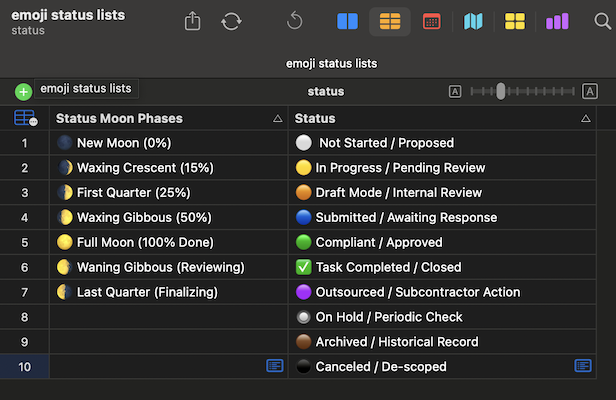
In this post, we’ll look at three ways to implement these status indicators: Pick Lists, Calculations Fields, and Script Fields.
1. The Visual Pick List: Standardizing Your Workflow**
The simplest way to use emojis is by including them directly in a Pick List. This ensures that every time a user selects a status, the icon is baked right into the data.
How to do it:
- Go to Lists in Tap Forms and create a new Pick List (e.g., "Project Status").
- Paste your emoji followed by the text label (e.g., 🟢 Compliant / Approved).
- Assign this list to a Text field in your Form.
Pro Tip: Using the "Standard Progress" set (⚪️, 🟡, 🟢, ✅) creates a natural color gradient that helps your brain process the lifecycle of a record without even reading the words.
2. The Calculation Field: Automatic Status Flags**
Sometimes you don't want to manually pick a status; you want Tap Forms to tell you the status based on other data, like a due date or a financial value.
The Scenario: You want a "Risk Level" field to automatically show a 🔴 Red circle if a deadline is missed, or a ⚠️ Warning sign if it's approaching.
The Formula: Using an IF statement in a Calculation field (Result Type: Text), you can automate your "Urgency & Risk" indicators:
IF([Days Remaining] < 0; "🔥"; IF([Days Remaining] < 30; "⚠️"; "✅"))
Now, your records will "flag" themselves. A quick scroll through your list view will immediately draw your eye to the 🔥 icons that need immediate attention.
3. Script Fields: Complex Progress Visualization**
For the ultimate "dashboard" feel, use a Script Field to represent progress over time. This is where the Moon Phase indicators shine. Unlike a simple calculation, scripts can handle multiple variables to give you a nuanced view of your data.
The Scenario: You want to visualize the completion percentage of a task using Moon Phases.
Sample Script snippet:
var percent = record.getFieldValue('fld-YOUR_PERCENT_ID');

if (percent >= 100) {
    "🌕 Full Moon (100%)";
} else if (percent >= 50) {
    "🌔 Waxing Gibbous (50%)";
} else if (percent >= 25) {
    "🌓 First Quarter (25%)";
} else {
    "🌑 New Moon (0%)";
}
This transforms a boring number field into a sophisticated visual progress bar that makes your database look like a professional custom app.
Your Emoji Cheat Sheet
To get you started, here are a few of our favorite sets to copy and paste into your own Tap Forms documents:
- Urgency: 🚨 Critical Failure | ⚠️ Nearing Deadline | 🛑 Stop Work
- Administrative: 🔒 Classified | ⚖️ Legal Review | 🛡️ Security Mandate
- Milestones: 🚀 Kickoff | 🏗️ Implementation | 📦 Delivery Confirmed
- Financial: 💰 Funding Mandate | 🖋️ Signature Required
Final Thoughts & Hinds
By adding a layer of visual communication to your forms, you reduce cognitive load and make data entry—and data review—a much more pleasant experience.
To use other Emoji characters, use the Emoji Picker on Mac (Cmd + Ctrl + Space) or the emoji keyboard on iOS.
Potential Status Lists
Here are several compiled status lists with different indicators you might want to use in your own projects.
The "Standard" Progress (10)
⚪️ White: Not Started / Proposed
🟡 Yellow: In Progress / Pending Review
🟠 Orange: Draft Mode / Internal Review
🔵 Blue: Submitted / Awaiting Government Response
🟢 Green: Compliant / Approved
✅ Checkmark: Task Completed / Closed
🟣 Purple: Outsourced / Subcontractor Action
🟤 Brown: Archived / Historical Record
⚫️ Black: Canceled / De-scoped
🔘 Radio Button: On Hold / Periodic Check
The "Urgency & Risk" Indicators (7)
🔴 Red: Non-Compliant / Action Required
🚨 Siren: Critical Failure / Audit Risk
⚠️ Warning: Nearing Deadline (Under 30 days)
🔥 Fire: Immediate Attention Required (Today/Past Due)
🛑 Stop: Cease Work / Stop Work Order
⏳ Hourglass: Delayed by Government Agency
📣 Megaphone: Escalated to Management
The "Financial & Administrative" (8)
💰 Money: Funding/Invoicing Mandate
📑 Document: Paperwork Only (Administrative)
🖋️ Pen: Signature Required (CO/COR)
🔒 Lock: Classified / Controlled Unclassified Info (CUI)
🔓 Unlock: Public Release Approved
⚖️ Scales: Legal Review Required
🔍 Magnifier: Under Internal Audit
🛡️ Shield: Security/Cybersecurity Mandate
The "Specific Milestones" (7)
🚀 Rocket: Phase I Launch / Kickoff
🏗️ Construction: Implementation Phase
🧪 Flask: Testing & Validation (V&V)
📦 Box: Delivery Confirmed
🤝 Handshake: Subcontractor Agreement Linked
🏆 Trophy: Awarded / Option Year Exercised
📅 Calendar: Recurring/Annual Requirement
The "Moon Phase" Progress Indicators (Percentage Based)
🌑 New Moon (0%)
🌒 Waxing Crescent (15%)
🌓 First Quarter (25%)
🌔 Waxing Gibbous (50%)
🌕 Full Moon (100% Done)
🌖 Waning Gibbous (Reviewing)
🌗 Last Quarter (Finalizing)
🌘 Waning Crescent (Closing Out)
Author
- Daniel Leu, info@danielleu.com
Do you like this script? Are you using it? Please consider supporting me by buying me a coffee!

Thanks!
Last modified: Feb 16, 2026 4:43:45 PM
Tap Forms Consulting
Do you need help writing scripts for your Tap Forms Pro database? I'm happy to help you. Contact me to discuss your idea or project.
Web Design Consulting
Do you need help designing your web site or getting Backlight working the way you want? Contact me to discuss your needs.
Buy me a Coffee
If you like what I share here, please consider buying me a coffee or a print. This helps keeping me motivated to continue posting. Thank you!